For selected series and variants. TKDN values follow the official certificate per SKU; confirm the applicable documents before procurement.
DISPLAYS THAT INVITE PARTICIPATION
Ideas move from the screen to
seluruh ruangan.
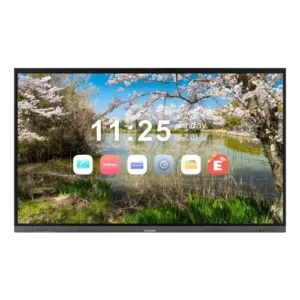
An IFP (Interactive Flat Panel) is a digital interactive board with a touchscreen that brings display, whiteboard, and interaction together in one place. How users work determines the right size, supporting devices, and configuration.
01 / INTERAKSI LANGSUNG
Presentations you can touch and build on.
Annotation, digital whiteboarding, and material discussion feel more natural when participants interact directly with the screen. Available features depend on the model and software.
Capture ideas on the material being discussed
Move from presentation to discussion
Adapt the flow to your team or class
02 / KOLABORASI HYBRID
One workspace for participants in and outside the room.
An IFP can be the visual center of a hybrid meeting when combined with the right camera, microphones, network, and conferencing platform.
Text-heavy material needs closer attention to readability
Large surfaces must stay proportional to viewing distance
Final specifications are calculated from site conditions
03 / ROOM & MOUNTING
Size and position follow how the room is used.
The farthest participant distance, mounting height, and mobility needs shape the everyday experience.
Wall mount
A fixed surface for rooms with a clear layout.
Mobile stand
More flexible when the screen moves between rooms.
How to choose an Interactive Flat Panel for your project
Room size, collaboration style, and device integration determine the right IFP.
01
Match the size to the room
Consider the farthest participant's distance, seating layout, mounting height, and on-screen readability.
03
Design hybrid meeting connectivity
Make sure ports, network, camera, microphone, and conferencing platform can be integrated as needed.
02
Check interaction needs
Compare touch, annotation, whiteboard, screen sharing, and operating system capabilities to fit how your team or class works.
04
Choose mounting and support
Decide on a wall mount or mobile stand, power requirements, user training, and post-installation service.
PROJECT TRACK RECORD
Workspaces across institutions and companies.
IMTeknologi's portfolio covers display and AV system implementations for commercial, education, and government needs. Below are some of the names listed in our public portfolio.
FAQ INTERACTIVE FLAT PANEL
Interactive Flat Panel FAQ
Initial answers before choosing a model, specifications, and installation requirements.
What is the difference between an interactive flat panel and a regular TV?
An IFP is designed for direct interaction such as touch, annotation, and whiteboarding. Exact features vary by model and software.
Is an IFP suitable for schools and meeting rooms?
Yes. Choose the size, apps, user access, and audio-video devices based on the learning or meeting activities in that room.
Does an IFP always need an internet connection?
Some basic functions can run locally, while video conferencing, syncing, and cloud services need a connection. Check the features of each model.
Is a TKDN *40% IFP available?
Some Interactive Flat Panel variants carry a TKDN *40% claim. Confirm the valid certificate for the SKU before making it a procurement requirement.